Free plan in your workspace
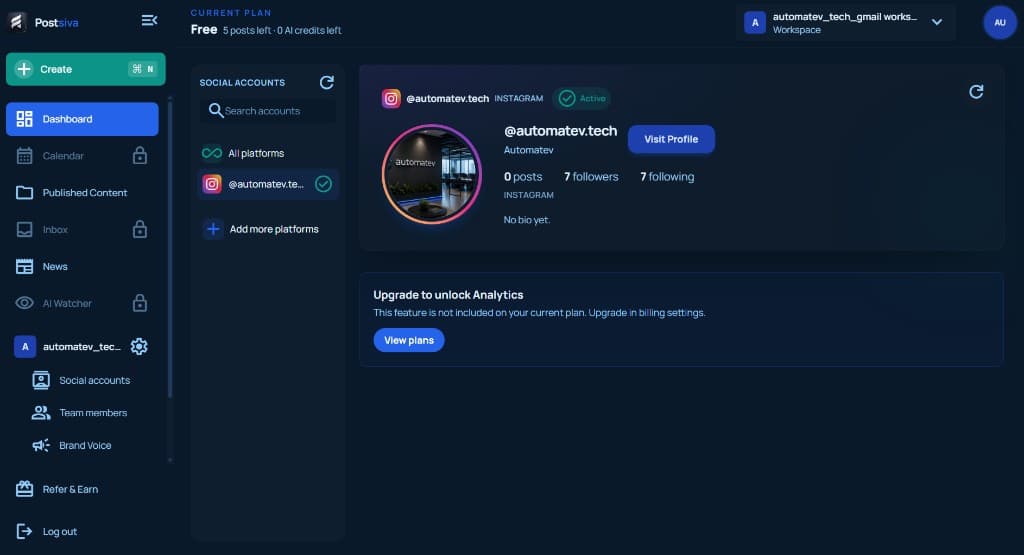
When Free is active, the header shows CURRENT PLAN Free with remaining posts and AI credits (for example 5 posts left · 0 AI credits left). Connected accounts can still show Active — plan limits control features and quotas, not whether a channel stays linked.
What Free locks or limits
- Header quotas — posts left and AI credits left for this billing period.
- Locked nav items — Calendar, Inbox, AI Watcher, and similar features may show a padlock until you upgrade.
- Analytics — Social accounts may show Upgrade to unlock Analytics with a View plans button instead of full insights.
You can still open Social accounts, connect platforms within Free limits, and use Create for remaining posts. Compare Free vs Starter vs Pro on Understand plans and billing basics, then upgrade when you need schedule, inbox, or more posts.
Upgrade when you need more
- 1
Open plans from the upgrade prompt
Select View plans on the analytics upgrade card, or open billing settings from your plan area.
- 2
Choose the plan that removes the blocker
Upgrade when you need more posts, AI credits, calendar scheduling, inbox, or analytics — not only for headroom you will not use yet.
- 3
Confirm Free vs paid in the header
After upgrading, CURRENT PLAN should show your paid tier (for example Pro Active) and updated posts / AI credit balances.